
Ask about RIFE OC-3 Dental Laptop Cart with Keyboard Tray and Drawer
Need Help?
Get the right model recommendation.
Send your quantity, use case and accessories needed. Rife will suggest the correct configuration.
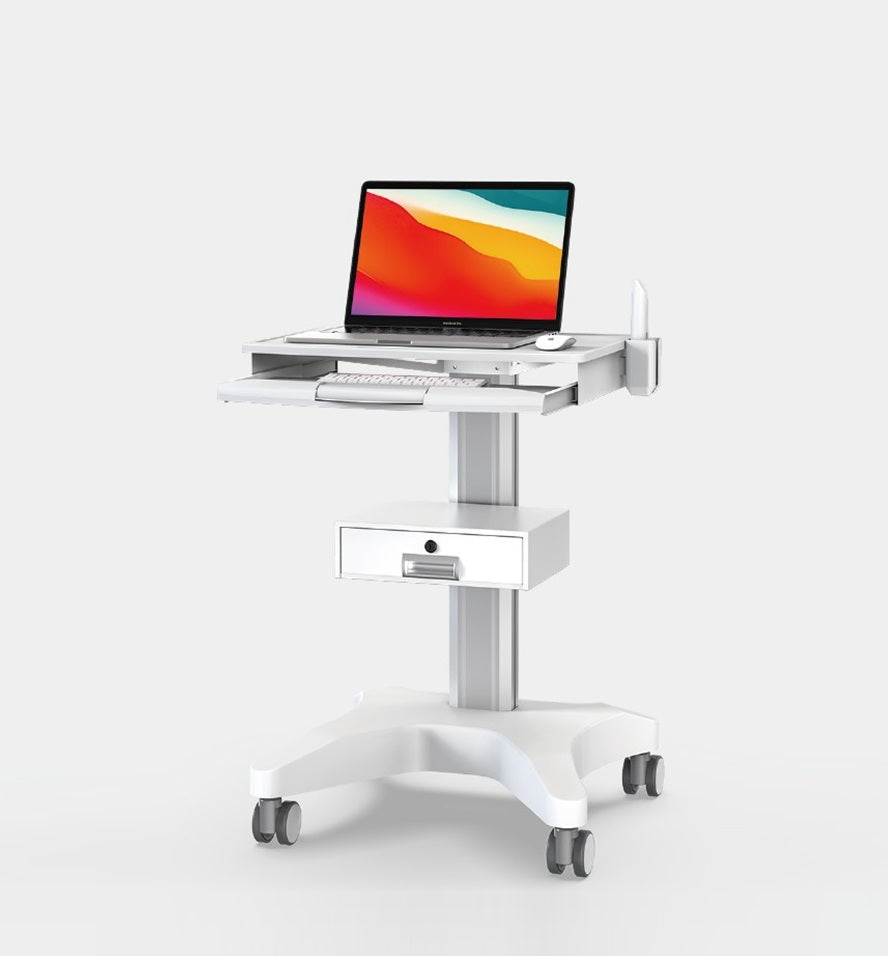
RIFE OC-3 is a dental laptop cart designed around a laptop-focused work surface, keyboard tray and drawer for dental accessories. It is intended for dental clinics, treatment rooms and mobile imaging workflows and can be configured around the actual computer, display, scanner, camera, printer, storage or clinical equipment required for the project.
RIFE OC-3 Dental Laptop Cart with Keyboard Tray and Drawer
The defining purpose of this model is a laptop-focused work surface, keyboard tray and drawer for dental accessories. Instead of presenting the cart as a generic trolley, the configuration should be evaluated as a complete workstation: work surface, equipment mounts, user reach, cables, storage, mobility and power must function together.
Key Features
- Dedicated mobile workstation for dental digital equipment
- Monitor, laptop or computer support according to model
- Scanner, camera, keyboard and CPU-holder options
- Lockable wheels for stable chairside positioning
- By using an ergonomic cart neck- and back complaints can be avoided
- Hide your cables top keep the workplaces nice, tidy and easy to clean
How This Dental Laptop Cart Supports the Workflow
A dental cart should be configured around the exact scanner, camera, monitor and computer rather than treated as a generic trolley. Cable length, handpiece placement, screen viewing angle, cleaning access and movement around the dental chair all affect the final layout.
Applications
Intraoral scanning
Keep the scanner, display and computer together so the system can move between operatories.
Dental imaging and diagnosis
Position one or two monitors for image review, patient explanation and treatment planning.
Dental photography and cameras
Support an intraoral camera or photographic workflow with suitable holders and cable organisation.
Chairside digital documentation
Use a mobile keyboard, laptop or monitor workstation close to the treatment chair without occupying fixed cabinetry.
Technical Specifications and Configuration Details
| Size | 12-17" |
|---|---|
| Max Load | 22bs |
| Volume | 87*63*33cm |
Additional Details Retained from the Existing Listing
- The cart is easily height adjustment conceals and routes cables
The technical information above has been retained from the current product listing. Because some models are configurable, final dimensions, loading limits, equipment compatibility, accessories and colour must be confirmed in the approved quotation and specification sheet.
Planning the Correct Configuration
Provide the scanner or camera model, monitor size and VESA pattern, laptop or CPU dimensions, keyboard requirements, equipment weight and preferred holder position. Confirm whether the cart will move between operatories and whether drawers or baskets are required.
Equipment Compatibility and Safety Review
Before supply, RIFE should review the centre of gravity, equipment weight, mounting pattern, cable movement, wheel and brake selection, electrical load and the way users will push or position the cart. Accessories should not be added only because they fit physically; they must also remain reachable, stable and suitable for the work environment.
Installation, Cleaning and Day-to-Day Use
Choose a parking position that does not obstruct doors, corridors or emergency routes. Users should lock the wheels before operating the workstation, route cables away from moving parts and follow the organisation's cleaning and electrical-safety procedures. In hospitals and dental clinics, the customer should confirm that selected surfaces and accessories are compatible with its infection-control process.
Why Configure the Cart with RIFE?
RIFE can review the cart, mounts, work surfaces, storage, peripherals and power requirement as one system. This is particularly important for customised B2B deployments where a standard product image may not show the final monitor, computer, scanner, printer, battery or drawer arrangement required at site.
Related Models
H2V Dental Computer Cart H2 Dental Scanner Cart H1-P Dental Computer Cart
Request a Techno-Commercial Quotation
Request a proposal for the RIFE OC-3. Include the quantity, delivery city, equipment list, monitor or laptop details, required accessories and any storage or power requirements. The RIFE team can then recommend the suitable configuration and provide project pricing.
Frequently Asked Questions
What is the main use of the OC-3?
The OC-3 is designed as a dental laptop cart for dental clinics, treatment rooms and mobile imaging workflows. The final equipment and accessory configuration should match the intended workflow.
What information is needed before ordering?
Please share the equipment dimensions, total weight, display size and VESA pattern where relevant, required accessories, installation location, quantity and preferred working-height range.
Are the computer, monitor or medical devices included?
They are not included unless specifically listed in the approved quotation. The page describes the cart and available configuration options.
Can RIFE customise the cart?
Selected dimensions, mounts, shelves, drawers, holders, colour and power options can be reviewed for project quantities, subject to technical feasibility.