
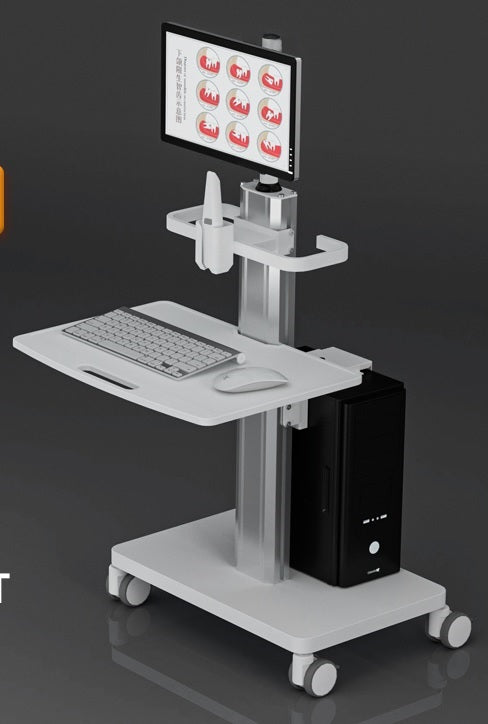
Ask about Dental Computer Cart with Scanner Holder and Keyboard Tray (OC-2T)
Mobile dental computer workstations offer an array of models and options for accessing health records at the point of care. Featuring light weight construction, ergonomic design and clinician friendly features Capsa’s mobile computing solutions help improve workflow efficiency and enhance patient care.
- TV size:15-32"
- Max Load: 22lbs
- Max Load: 10kg
- VESA: 75x75/100x100
- GW: 18kg
- Volume: 105*63*18cm
Frequently Asked Questions
How do mobile dental computer workstations improve patient care and clinical workflow?
Mobile dental computer workstations are specifically designed to bring electronic health records directly to the point of care, allowing clinicians to maintain engagement with patients while updating charts in real time. By utilizing a lightweight and ergonomic construction, these carts streamline daily tasks and reduce physical strain on staff throughout the workday. This mobile accessibility ensures that dental professionals can access critical data instantly at the bedside, leading to more accurate documentation and a more efficient environment for both the provider and the patient.
What size monitors are compatible with a standard mobile medical computer cart?
Most modern mobile medical computer carts are engineered to accommodate a wide range of display sizes to meet various clinical and diagnostic needs. These workstations typically support monitors ranging from 15 inches up to 32 inches, providing ample screen real estate for viewing detailed dental X-rays and complex patient records. This flexibility in screen size allows dental practices to customize their mobile stations based on the specific software requirements and visual preferences of their clinical team without sacrificing stability.
What is the maximum weight capacity for a mobile dental workstation?
When selecting a mobile dental workstation, it is important to consider the total weight of the equipment being mounted to ensure the unit remains stable and easy to maneuver. These professional-grade carts are generally designed to support a maximum load of approximately 22 pounds, which is equivalent to 10 kilograms. This weight capacity is specifically balanced to hold a standard medical-grade monitor and integrated computing hardware while maintaining the "lightweight" feel necessary for quick movement between operatory rooms.
Do mobile dental computer carts follow universal mounting standards for monitors?
Yes, high-quality mobile dental computer workstations utilize industry-standard VESA mounting patterns to ensure seamless compatibility with a broad array of displays. Most models support both 75x75mm and 100x100mm VESA configurations, which are the most common standards for computer monitors and small televisions. This standardized approach simplifies the initial setup process and ensures that dental offices can easily upgrade or replace their screens in the future without needing to purchase an entirely new mobile workstation.
Why is ergonomic design important for mobile point-of-care computing solutions?
Ergonomic design is a critical feature of mobile point-of-care solutions because it directly impacts the long-term health and daily productivity of dental clinicians. By incorporating clinician-friendly features and adjustable components, these workstations help prevent repetitive strain injuries and physical fatigue during long clinical shifts. A well-designed mobile cart allows the user to position their computer at the optimal viewing angle and height, fostering a more comfortable work environment that enables the staff to focus entirely on delivering high-quality patient care.
DELIVERY
- Dispatch: Within 24 Hours
- Free shipping across all products on a minimum purchase of $50.
- International delivery time - 7-10 business days
- Cash on delivery might be available
- Easy 30 days returns and exchanges
RETURNS
If you do not like the product you can return it within 15 days - no questions asked. This excludes bodysuits, swimwear and clearance sale items.
We have an easy and hassle free return policy. Please look at our Delivery & Returns section for further information.
- Frequent cleaning with a clean buff cloth without any residue of any cleaning products removes dirt.
- Dusting with a dry cloth can scratch, so lightly spritz your cleaning cloth with water.
- A vacuum cleaner will effectively remove any dust from surfaces and crevices.
- Always use a coaster for drinks, and be mindful of any other potential sources of water damage, such as flower vases.
- Sharp objects can cut right through the surface of the wood, leaving behind unsightly scratches and gouges.
- Do not place hot utensils directly on the table top to avoid damage and discoloration
- Avoid direct sunlight as it will affect your furniture. It can cause
your furniture to lose its shine and luster and begin to fade. - The table is designed to hold food, crockery and utensils, not heavy objects.
- Avoid sitting, standing, or jumping on the dining table or chairs. Also
do not throw heavy objects on the table, as this may damage the
product.
This tab is a useful tool that allows store to display different product details for each individual product. This feature provides a more comprehensive and tailored approach as it enables companies to showcase specific information related to their products.
It is an excellent way to provide customers with in-depth details such as ingredients, materials used, dimensions, and other specifications that are unique to each product. By using the product custom tab, businesses can ensure transparency and accuracy in providing product information, which builds trust and credibility among consumers. This feature also gives customers the opportunity to make informed decisions based on their preferences and needs.