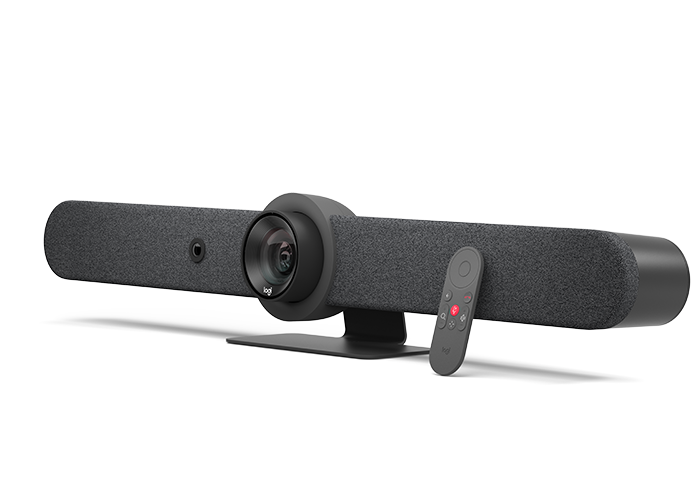
Ask about Logitech Rally Bar
USB Mode
Connect via USB to virtually any PC or Mac with no additional software needed.
Appliance Mode
Run supported video conferencing applications – such as Zoom®, Microsoft Teams®, and others – directly on the device with no computer or laptop required.
Cable Management
Ensure clean, confident installs with secure cable retention and minimal cabling.
Mounting options
Take advantage of multiple mounting options to deploy Rally Bar quickly and easily across all your midsize rooms.
Looks Brilliant
Upgrade the meeting experience with cinema-quality video, outstanding colour, and exceptional optical accuracy.
- Lossless optical zoom
- Razor sharp images at resolutions up to 4K
- AI Viewfinder for persistent room view and people count
- Motorized pan and tilt with RightSight™ auto-framing
- Stays Focused
Sounds Awesome
Rally Bar’s advanced audio engineering delivers powerful, room-filling sound and makes sure every voice is clearly heard.
- High-performance speaker drivers
- Adaptive beamforming mics
- A patented anti-vibration suspension system for full-duplex
- Port tube for enhanced low frequencies
Great Conversations
Sound Optimisation
Auto-level loud and soft voices – while suppressing unwanted noise – with AI-based RightSound™ technology that improves over time.
Adaptive Beamforming
Focus on the active talker with high-precision beamforming mics.
Full Duplex
Hear and be heard at the same time with an excellent full-duplex.
Expand the Conversation
Easily accommodate larger groups and spaces, starting with a 4.57 m mic pickup range and the option to extend up to three Rally mic pods
Super Smart
Keep the focus on meeting participants with AI Viewfinder, which uses scene awareness to optimize RightSight™ auto-framing and camera control.
AI-Driven Insights
Track room usage data from the Logitech Sync Dashboard, captured by AI Viewfinder’s people count function.
Simple To Manage
Monitor and manage your meeting room devices from one single platform with Logitech Sync. Plus, get business insights into how your rooms are being used.
Content includes:
| PRODUCT CATALOG | PRODUCT MANUAL |
|---|---|
 |
|
Frequently Asked Questions
Q: Can this run video conferencing apps without a computer?
A: Yes, it supports Appliance Mode, allowing compatible video conferencing applications to run directly on the device.
Q: What room size is it designed for?
A: It is built specifically for midsize meeting rooms.
Q: Does the camera automatically frame participants?
A: Yes, motorized pan and tilt with RightSight™ auto-framing keeps participants in view.
Q: How far can the microphones pick up sound?
A: The default pickup range is 4.57 meters and can be expanded with up to three additional mic pods.
Q: What’s included in the box?
A: It includes the unit, power supply, cables, remote control, lens caps, and user documentation.
DELIVERY
- Dispatch: Within 24 Hours
- Free shipping across all products on a minimum purchase of $50.
- International delivery time - 7-10 business days
- Cash on delivery might be available
- Easy 30 days returns and exchanges
RETURNS
If you do not like the product you can return it within 15 days - no questions asked. This excludes bodysuits, swimwear and clearance sale items.
We have an easy and hassle free return policy. Please look at our Delivery & Returns section for further information.
- Frequent cleaning with a clean buff cloth without any residue of any cleaning products removes dirt.
- Dusting with a dry cloth can scratch, so lightly spritz your cleaning cloth with water.
- A vacuum cleaner will effectively remove any dust from surfaces and crevices.
- Always use a coaster for drinks, and be mindful of any other potential sources of water damage, such as flower vases.
- Sharp objects can cut right through the surface of the wood, leaving behind unsightly scratches and gouges.
- Do not place hot utensils directly on the table top to avoid damage and discoloration
- Avoid direct sunlight as it will affect your furniture. It can cause
your furniture to lose its shine and luster and begin to fade. - The table is designed to hold food, crockery and utensils, not heavy objects.
- Avoid sitting, standing, or jumping on the dining table or chairs. Also
do not throw heavy objects on the table, as this may damage the
product.
This tab is a useful tool that allows store to display different product details for each individual product. This feature provides a more comprehensive and tailored approach as it enables companies to showcase specific information related to their products.
It is an excellent way to provide customers with in-depth details such as ingredients, materials used, dimensions, and other specifications that are unique to each product. By using the product custom tab, businesses can ensure transparency and accuracy in providing product information, which builds trust and credibility among consumers. This feature also gives customers the opportunity to make informed decisions based on their preferences and needs.