Skip to content
9899250704

sales@rifeindia.com

What are you looking for?

Popular Searches:

Popular Products


Logitech Swytch

Barcode :
SKU : Swytch

Regular price Rs. 123,995.00


/
Hurry up! Sales End In
00Days 00Hrs 00Min 00Sec
This promotion has expired!
Only 1 left - Selling fast
Spent Rs. 199.00 more to get free shipping
Estimated delivery between - .
Guarantee Safe Checkout

COMPLETE THE LOOK

Logitech Swytch

Logitech Swytch

Rs. 123,995.00

Ask about Logitech Swytch

Product Details

With a single USB connection, Logitech Swytch links a laptop to the room’s display, camera, and audio devices. Now, people can use meeting rooms with any video conferencing software, webinar platform, or streaming service.

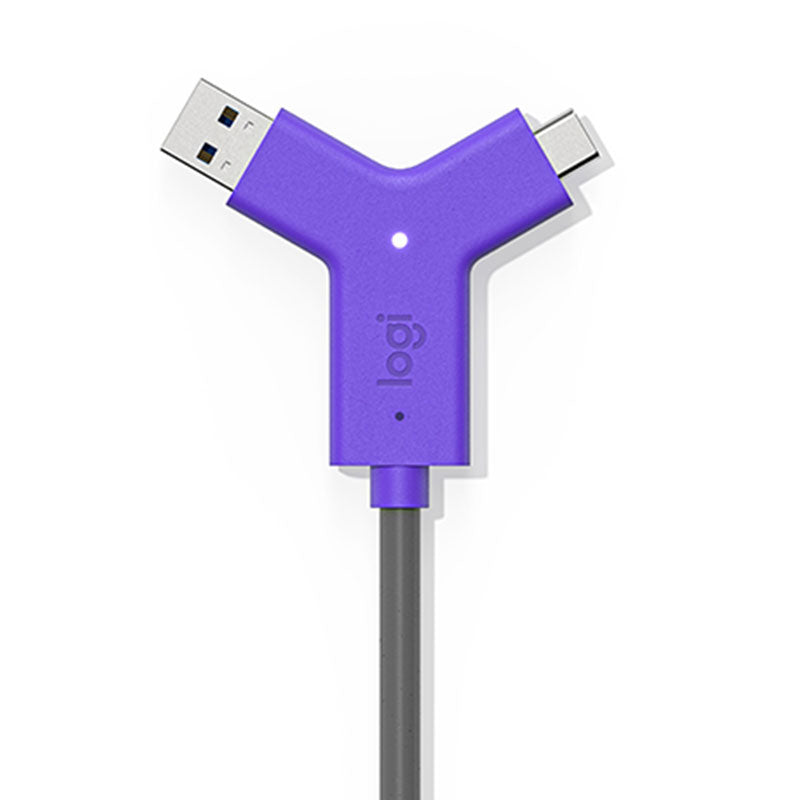
Logitech Swytch is a BYOM (bring your own meeting) laptop link for video conferencing in meeting rooms, linking a Windows® 10 laptop, MacBook®, or Chromebook to the room’s AV equipment with a single USB Type A or C connection.

Logitech Swytch works in rooms with a dedicated computer — including Microsoft Teams Rooms and Zoom Rooms — and in BYOM rooms equipped with a only conference camera and display. Simply connect your Logitech Swytch to the laptop via USB and launch the desired application to enjoy broadcast-quality video and content sharing at up to 4K resolution.

With a one-cable laptop link to a meeting room’s AV devices, Logitech Swytch makes every room ready for any meeting.

Any Meeting, Every Room

With an innovative design that maximises compatibility and incorporates DisplayLink® Plug-and-Display technology, Logitech Swytch offers a one-cable laptop link to a room’s conference camera and display, making it easy for teams to meet, present, and stream over any service.

The Flexible Room Solution

With Logitech Swytch, you can deploy video conferencing room solutions from providers like Microsoft or Zoom, while also allowing people to use meeting rooms with other video services.

Say Yes to Easy

To join or host a video meeting, simply plug the iconic Logitech Swytch Connector into any laptop with a USB 3.0 or higher Type A or Type C port. No dongles, no splitters, no HDMI required.

Smart Topology

It’s easy to deploy Logitech Swytch in rooms with USB conference cameras. Just connect the Logitech Swytch Hub to the meeting room equipment and place the Logitech Swytch Connector within easy reach.

Huddle to Small rooms
SWYTCH + MEETUP
With Logitech Swytch in focus and huddle rooms, users can meet face-to-face with customers, vendors, and other external hosts on their preferred video conferencing service.

Medium to Large rooms
SWYTCH + RALLY
With Logitech Swytch in medium and large rooms, the whole team can join webinars, take online classes, and engage face-to-face with customers and partners on external services.

Everything in its Place

Logitech Swytch integrates beautifully with your meeting rooms. Keep the tabletop clean and organised with the included magnetic dock, or route the Logitech Swytch Connector through an existing cable well. Either way, robust cable retention keeps connections tight.

Turns Laptops into Room Solutions

Thanks to hidden cabling and a convenient magnetic dock, Logitech Swytch keeps every room tidy and organised, even those without dedicated computers. A single connection and straightforward user experience make it easy for anyone to use their personal laptop for team collaboration.

Power Delivery

Never run out of power when hosting a video meeting: Logitech Swytch provides 60 watts of power to laptops that charge via USB-C.

Plug-and-display

Thanks to DisplayLink Plug-and-Display technology, a single connection is all you need for both USB devices and an HDMI display.

Full Motion Video + Audio

Display movies from a laptop on the room’s display and speakers, and share full-motion video and audio into online meetings.*

* Works with video conferencing services that support content sharing with audio

Works with Most Laptops

Featuring both USB Type A and Type C connectors, Logitech Swytch works with Chromebooks and Windows® and Mac laptops with USB 3.0.

Remote Management

Monitor and manage Logitech Swytch, MeetUp, Rally, and other meeting room devices with Logitech Sync.

Deployment Resources

From wiring diagrams to quick reference cards, a range of deployment resources simplify installation and make it easy to introduce Logitech Swytch to end-users.


Frequently Asked Questions

Q: How does a laptop connect to the room system?
A: A single USB Type-A or Type-C connection links the laptop to room AV equipment.

Q: Is it compatible with different conferencing platforms?
A: Yes, it works with virtually any video conferencing or streaming service.

Q: Can it charge connected laptops?
A: Yes, it provides up to 60W of power delivery via USB-C.

Q: Does it support both USB-A and USB-C laptops?
A: Yes, it includes connectors for both USB-A and USB-C.

Q: Can it be remotely managed?
A: Yes, device management is available through Logitech Sync.

Shipping & Returns
DELIVERY
  • Dispatch: Within 24 Hours
  • Free shipping across all products on a minimum purchase of $50.
  • International delivery time - 7-10 business days
  • Cash on delivery might be available
  • Easy 30 days returns and exchanges
RETURNS

If you do not like the product you can return it within 15 days - no questions asked. This excludes bodysuits, swimwear and clearance sale items.
We have an easy and hassle free return policy. Please look at our Delivery & Returns section for further information.

Care & Maintenance
  • Frequent cleaning with a clean buff cloth without any residue of any cleaning products removes dirt.
  • Dusting with a dry cloth can scratch, so lightly spritz your cleaning cloth with water.
  • A vacuum cleaner will effectively remove any dust from surfaces and crevices.
  • Always use a coaster for drinks, and be mindful of any other potential sources of water damage, such as flower vases.
  • Sharp objects can cut right through the surface of the wood, leaving behind unsightly scratches and gouges.
  • Do not place hot utensils directly on the table top to avoid damage and discoloration
  • Avoid direct sunlight as it will affect your furniture. It can cause
    your furniture to lose its shine and luster and begin to fade.
  • The table is designed to hold food, crockery and utensils, not heavy objects.
  • Avoid sitting, standing, or jumping on the dining table or chairs. Also
    do not throw heavy objects on the table, as this may damage the
    product.
Custom Tab

This tab is a useful tool that allows store to display different product details for each individual product. This feature provides a more comprehensive and tailored approach as it enables companies to showcase specific information related to their products.

It is an excellent way to provide customers with in-depth details such as ingredients, materials used, dimensions, and other specifications that are unique to each product. By using the product custom tab, businesses can ensure transparency and accuracy in providing product information, which builds trust and credibility among consumers. This feature also gives customers the opportunity to make informed decisions based on their preferences and needs.

RECOMMENDED PRODUCTS

RECENTLY VIEWED PRODUCTS

Add Order Note
Coupon Code