
Ask about Logitech TAP IP
MAKE VIDEO MEETINGS SIMPLE TO JOIN
Meetings start with just one touch with Logitech Tap IP, a network-connected touch controller for Logitech room solutions. With clean cable management and a range of available mounts, Tap IP installs easily and stays up and running.
VIDEO MEETINGS FOR ANY ROOM
Easily transform meeting rooms into video collaboration spaces with Tap IP and Logitech room solutions. Start with pre-configured solutions that include video bars, conference cams, computes and other devices, and add scheduling panels, digital whiteboards, and accessories to power effective collaboration.
MEETING ROOM TOUCH CONTROLLER WITH POE CONNECTIVITY
More than a meeting room controller, Logitech Tap IP helps you achieve a consistent and seamless user experience across your video conferencing deployment.
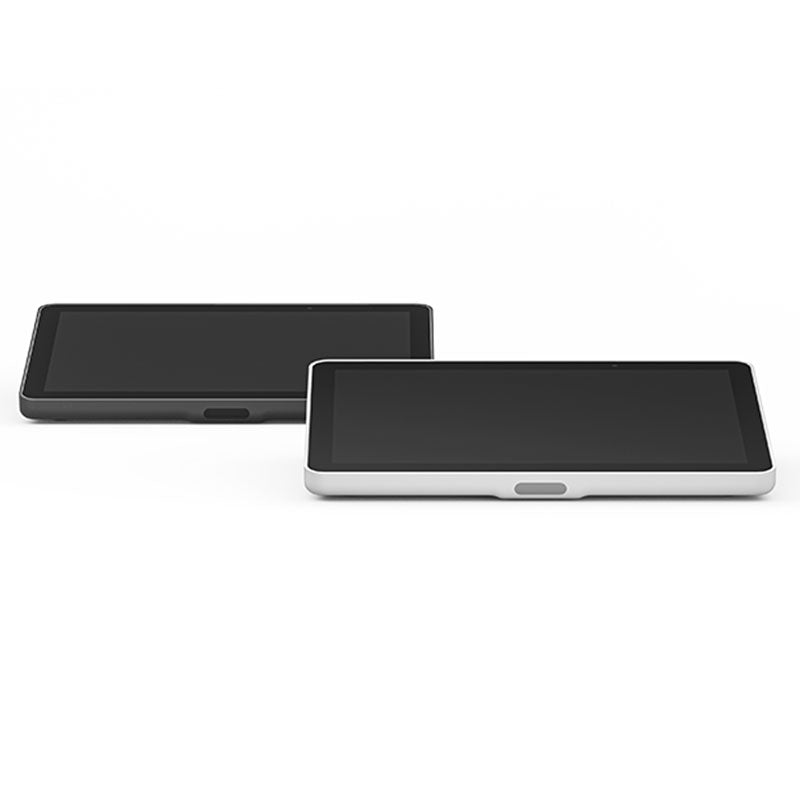
This purpose-built touch controller has just the right presence with a spacious 10.1″ display and sleek, low profile. Take advantage of its single Power over Ethernet (PoE) connection and variety of mounting options to install the touch controller anywhere in the room. Prevent accidental disconnections thanks to built-in cable retention and strain relief, and be confident that each room stays ready for the next video meeting.
EASY TO USE
One-touch join: Easily start and join meetings with just one tap.
10.1″ touch display: Spacious and responsive touch screen resists fingerprints for high legibility, and is sealed to protect components.
Motion sensor: Built-in motion sensor allows for always-on readiness when a user approaches, and saves power when idle.
Sleek, low profile: Comfortable 14° angle allows for easy viewing, while providing an unobtrusive presence in the room.
SIMPLE TO SET UP
Single PoE cable: One cable for both power and data means flexible placement anywhere in the room, untethered to the room system and without the need for long cable runs. Clean cable management: Built-in cable retention and strain relief system hides the PoE cable entirely within its enclosure, and secures it to prevent unwanted disconnections. Multiple mounting options: Secure Tap IP almost anywhere in the room with available Table, Riser, and Wall Mounts for convenient placement near room participants.
PICK YOUR PLATFORM
Tap IP can be configured with leading video conferencing services to deliver a seamless and consistent meeting experience across your deployment.
nable easy and effective meetings for onsite and remote workers. Tap IP and the Logitech suite of room solutions integrate with leading video conferencing services for a seamless meeting experience.
DEPLOY ROOM SOLUTIONS WITH EASE
Transform collaboration spaces with Logitech Tap IP and leading video conferencing room solutions. Deliver one-touch join, easy content-sharing, and a seamless meeting experience across all rooms.
JUST THE RIGHT PRESENCE
With a spacious 10.1” display, low profile, and motion sensor for always-on readiness, Tap IP has a sleek and unobtrusive presence in the room.
SIMPLE AND SECURE CABLING
Streamline setup with a single cable that can be routed through the back or below the device. Keep connections tight with built-in strain relief and retention mechanisms.
MULTIPLE MOUNTING OPTIONS
Install Tap IP almost anywhere in the room with Table and Riser Mounts that fit standard table grommets and rotate 180° for visibility and convenience. Or save table space in small rooms with the Wall Mount.
SINGLE CABLE SIMPLICITY
With a single Power over Ethernet cable, place Tap IP conveniently near room participants for a tidy and professional install.
SIMPLE TO MANAGE WITH LOGITECH SYNC
With Logitech Sync, you can monitor and manage Tap IP along with your other meeting room devices from one single platform.
Features:
- 10.1” HD Touch Controller
- Sleek, low profile Capacitive Touch screen
- Oleophobic Coating for Anti Fingerprint
- Comfortable 14° angle allows for easy viewing
- Power over Ethernet (PoE) device
- Power + Pairing over the network
- WiFi Dual-band, Bluetooth 5.0
- Motion sensor
- Built-in cable retention and strain relief for clean and secure connections
- Certified for Zoom Rooms, RingCentral Rooms
- PENDING MTRoA Certification
- Multiple mounting options
| PRODUCT CATALOG | PRODUCT MANUAL |
|---|---|
 |
|
Frequently Asked Questions
Q: How is this controller powered?
A: It uses a single Power over Ethernet (PoE) cable for both power and data.
Q: Is the screen resistant to fingerprints?
A: Yes, the touch display has an oleophobic coating to reduce fingerprints.
Q: Does it support one-touch meeting join?
A: Yes, meetings can be started or joined with a single tap.
Q: What mounting options are available?
A: It supports table, riser, and wall mounting options.
Q: Can it be centrally managed?
A: Yes, it can be monitored and managed through Logitech Sync.
DELIVERY
- Dispatch: Within 24 Hours
- Free shipping across all products on a minimum purchase of $50.
- International delivery time - 7-10 business days
- Cash on delivery might be available
- Easy 30 days returns and exchanges
RETURNS
If you do not like the product you can return it within 15 days - no questions asked. This excludes bodysuits, swimwear and clearance sale items.
We have an easy and hassle free return policy. Please look at our Delivery & Returns section for further information.
- Frequent cleaning with a clean buff cloth without any residue of any cleaning products removes dirt.
- Dusting with a dry cloth can scratch, so lightly spritz your cleaning cloth with water.
- A vacuum cleaner will effectively remove any dust from surfaces and crevices.
- Always use a coaster for drinks, and be mindful of any other potential sources of water damage, such as flower vases.
- Sharp objects can cut right through the surface of the wood, leaving behind unsightly scratches and gouges.
- Do not place hot utensils directly on the table top to avoid damage and discoloration
- Avoid direct sunlight as it will affect your furniture. It can cause
your furniture to lose its shine and luster and begin to fade. - The table is designed to hold food, crockery and utensils, not heavy objects.
- Avoid sitting, standing, or jumping on the dining table or chairs. Also
do not throw heavy objects on the table, as this may damage the
product.
This tab is a useful tool that allows store to display different product details for each individual product. This feature provides a more comprehensive and tailored approach as it enables companies to showcase specific information related to their products.
It is an excellent way to provide customers with in-depth details such as ingredients, materials used, dimensions, and other specifications that are unique to each product. By using the product custom tab, businesses can ensure transparency and accuracy in providing product information, which builds trust and credibility among consumers. This feature also gives customers the opportunity to make informed decisions based on their preferences and needs.