
Ask about Logitech TAP Scheduler
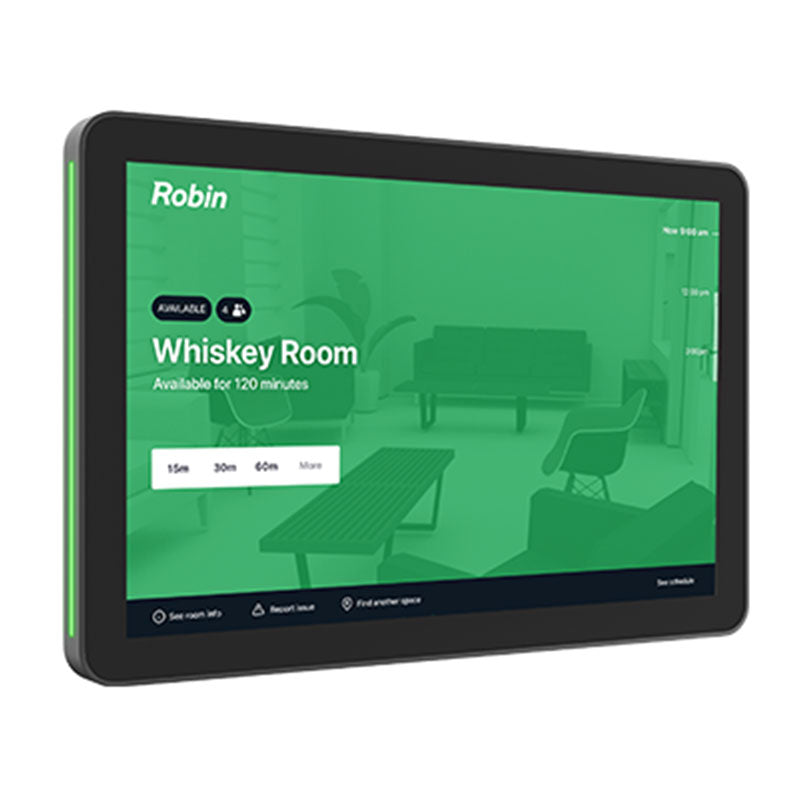
The Logitech Tap Scheduler is a scheduling panel that integrates with the room systems in conference rooms, certified for Microsoft Teams, Zoom Rooms, as well as Meetio and Robin for use with Google Workspace. The Tap Scheduler allows you to see the scheduled meetings outside of a conference room, as well as Reserve the room if it is available.
Make the most out of every meeting space by helping workers easily find the right room — whether that’s checking room details to make sure it’s the right place, or reserving a room for impromptu or scheduled meetings. With a spacious screen and sleek, unobtrusive profile, Tap Scheduler is designed for easy viewing and usability. Complete with glass, mullion, and wall mounts, Tap Scheduler can be conveniently installed outside any room. Its built-in cable management hides cables for a clean and professional look. Count on Tap Scheduler for reliable performance with durable components that are built to last.
Right Place, Right Time
Tap Scheduler makes it easy to see meeting details and reserve a room for ad hoc or future meetings. Easily deploy as a purpose-built scheduling panel for leading room scheduling solutions to help workers find and claim the right space.
Green Means Go
Quickly find an open room through coloured LED lights that show availability at a distance.
Clean and Easy Install
Included mounts and clean cabling help ensure a tidy and professional setup.
Glass Mounting
Secure Tap Scheduler while maintaining a clean look on both sides of the glass.
Mullion Mounting
Secure Tap Scheduler to a door or window frame for greater visibility using the included mount.
Wall Mounting
Place and secure Tap Scheduler anywhere on a wall.
Cable Management
Hide cables in the wall, mullion, or in other directions, with multiple routing options.
Purpose-built as a Scheduling Panel
Tap Scheduler was designed for easy viewing and usability, with a spacious screen and a sleek, unobtrusive profile. Count on Tap Scheduler for reliable performance with durable components that are built to last.
Make the Most of Your Space
Easily add Tap Scheduler to a variety of meeting rooms, from phone booths to video rooms to hangout nooks, helping employees quickly find the right meeting location. Simple installations and an intuitive user experience drive fast deployment and adoption.
Pick your Platform
Enable a seamless meeting experience through Tap Scheduler and Logitech’s suite of room solutions, which integrate with Microsoft Teams®, Zoom Rooms™, and other service providers to raise the bar on collaboration.
For latest certification and compatibility information, click here.
Simple to manage with Logitech Sync
With Logitech Sync, you can monitor and manage Tap Scheduler along with your other meeting room devices from one single platform.
An All-in-one Service Plan
Logitech Select is a comprehensive service plan that delivers reliability, continuity, and peace of mind for each room you designate. Select provides 24/7 support, a dedicated Customer Success Manager*. product replacement, accelerated RMA, onsite spares* and advanced Sync analytics including customizable alerts through ServiceNow integration (available for users of Logitech Sync).
Features:-
- 10.1” HP (1280x800p) IPS Touch Screen
- Anti-fingerprint Oleophobic Coating
- Green (available) or Red (busy) Lighting status
- 0° Position angle for best accessibility and easy reading
- Low profile install: flush mounting, no offset
- Certified for MS Teams, Zoom, Robin*, Meetio*
- *Meetio and Robin integrate with Google Calendar and are certified as room scheduling solutions for Google Workspace.
- RJ45 Ethernet connectivity
- Wi-Fi Dual-Band
- PoE device
- Multi-Surface Mount included (VESA 100×100)
Content includes:-
- Logitech Tap Scheduler
- Multi-surface Mount (glass/drywall)
- Corner Mount Accessory
- Mullion Mount
- Mounting Hardware
- Documentation
| PRODUCT CATALOG | PRODUCT MANUAL |
|---|---|
 |
|
Frequently Asked Questions
Q: What is the main purpose of this panel?
A: It displays room availability and allows quick room reservations outside meeting spaces.
Q: How can availability be seen from a distance?
A: Integrated LED lights show green for available and red for busy rooms.
Q: What mounting options are supported?
A: It supports glass, wall, and mullion mounting using included hardware.
Q: How are cables managed?
A: Built-in cable routing hides cables for a clean and professional installation.
Q: What size is the display?
A: It features a 10.1-inch IPS touch screen.
DELIVERY
- Dispatch: Within 24 Hours
- Free shipping across all products on a minimum purchase of $50.
- International delivery time - 7-10 business days
- Cash on delivery might be available
- Easy 30 days returns and exchanges
RETURNS
If you do not like the product you can return it within 15 days - no questions asked. This excludes bodysuits, swimwear and clearance sale items.
We have an easy and hassle free return policy. Please look at our Delivery & Returns section for further information.
- Frequent cleaning with a clean buff cloth without any residue of any cleaning products removes dirt.
- Dusting with a dry cloth can scratch, so lightly spritz your cleaning cloth with water.
- A vacuum cleaner will effectively remove any dust from surfaces and crevices.
- Always use a coaster for drinks, and be mindful of any other potential sources of water damage, such as flower vases.
- Sharp objects can cut right through the surface of the wood, leaving behind unsightly scratches and gouges.
- Do not place hot utensils directly on the table top to avoid damage and discoloration
- Avoid direct sunlight as it will affect your furniture. It can cause
your furniture to lose its shine and luster and begin to fade. - The table is designed to hold food, crockery and utensils, not heavy objects.
- Avoid sitting, standing, or jumping on the dining table or chairs. Also
do not throw heavy objects on the table, as this may damage the
product.
This tab is a useful tool that allows store to display different product details for each individual product. This feature provides a more comprehensive and tailored approach as it enables companies to showcase specific information related to their products.
It is an excellent way to provide customers with in-depth details such as ingredients, materials used, dimensions, and other specifications that are unique to each product. By using the product custom tab, businesses can ensure transparency and accuracy in providing product information, which builds trust and credibility among consumers. This feature also gives customers the opportunity to make informed decisions based on their preferences and needs.