
Cloud-Managed Hot Desk Lockers: Enterprise Buying Guide
Plan dynamic day lockers, employee access, advance reservations and workplace integrations for agile offices and hybrid teams.
Flexible storage for unassigned workplaces
Hot-desk lockers replace permanently assigned pedestals with shared compartments that can be reserved or allocated for a day, shift or longer period. The project should connect storage policy, employee identity, desk-booking workflow and facilities support—not simply install electronic locks.
Employee requests a desk and, where integrated, suitable storage.
The system assigns a free compartment under policy rules.
User presents an approved card, PIN, QR or mobile credential.
The locker closes out after checkout, expiry or staff review.
Relevant RIFE workplace locker products
The SL-Series is the current employee-storage product. The Intelligent Asset Locker adds cloud-led assignment, asset visibility and reporting for more controlled enterprise workflows.

SL-Series Employee Smart Lockers
The direct fit for employee belongings, staff storage and configurable day-locker access in offices and industrial workplaces.
View Employee Smart Lockers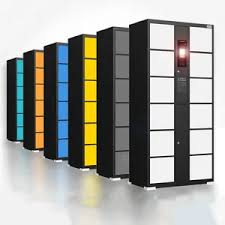
Cloud-Managed Intelligent Asset Lockers
Designed for remote allocation, tracked workplace equipment, cloud dashboard visibility, automatic records and links to wider business systems.
View Cloud-Managed Lockers
Omni Smart IT Asset & Break-Fix Locker
The relevant option when hybrid staff need unattended collection, return, swap or service-desk handover of laptops and other IT equipment.
View Omni IT Asset LockerServiceNow and Jira integration is project-specific
Do not assume a standard connector. Request API documentation for the selected locker platform, then define the system of record, authentication, employee identifier, reservation trigger, allocation response, cancellation, timeout, webhooks, error handling and audit ownership. A desk check-in can allocate a locker only after this end-to-end workflow is designed and tested.
What to specify
Allocation model
First-available, advance booking, same-zone matching, team lockers or long-term assignment.
Identity & access
Corporate RFID card, PIN, QR, app, NFC or Bluetooth—and the fallback when a credential fails.
Connectivity
Ethernet, Wi-Fi, offline behaviour, firewall rules, certificates, monitoring and remote support.
Workplace integration
Desk booking, HR directory, SSO, ITSM, visitor system, notifications and analytics.
Administration
Remote release, PIN reset, occupancy, expiries, roles, reports and retention.
Physical design
Compartment mix, employee belongings, charging, anchors, ventilation and location.
Choose the operating model
| Model | Best suited to | Key rule |
|---|---|---|
| Walk-up day locker | Employees choose any available locker on arrival | Automatic release and overdue-item procedure |
| Advance reservation | Workers want guaranteed storage before travel | No-show cancellation and reservation expiry |
| Desk + locker bundle | Storage should be near a reserved workspace | Reliable mapping between sites, floors, zones and availability |
| Mixed assignment | Hybrid staff share while resident staff retain lockers | Clear eligibility and capacity allocation |
| Team/shared locker | Departments store common items or documents | Group access, ownership and checkout accountability |
Enterprise integration checklist
- Map authoritative employee identities across HR, SSO, booking and locker systems.
- Decide whether desk reservation, office check-in or a separate action triggers allocation.
- Define API authentication, least-privilege access, encryption and secret rotation.
- Handle duplicate bookings, cancellations, no-shows, network loss and full-capacity events.
- Test notifications, lost-card recovery, remote release and after-hours support.
- Agree retention and access for reservation, entry, occupancy and incident records.
- Pilot one floor and measure utilisation, failed access, help-desk tickets and user completion.
Frequently asked questions
How can hot-desk lockers integrate with ServiceNow, Jira or HR systems?
Through a supported API, middleware or custom connector for the selected locker platform. The project must map identities and events, authenticate securely, define allocation logic and test failure handling.
Can a desk booking automatically reserve a nearby locker?
Yes, when the desk and locker systems exchange location and availability data. The integration must define zone mapping, timing, cancellation and what happens when no suitable locker is free.
Which employee access method is best?
Corporate RFID cards are convenient where compatible; PIN or QR can support guests and fallback; mobile credentials may support reservations. Choose after security, privacy and user-accessibility review.
What happens when a day locker is not released?
The policy should set expiry, reminders, grace periods, authorised remote opening, stored-item handling and a complete administrative record.
Does cloud management require constant internet access?
That depends on the selected platform. Specify permitted offline access, local caching, event synchronisation, alerts and recovery after a network interruption.
Design a hybrid-work locker pilot
Share attendance patterns, office zones, access credentials, compartment requirements, desk-booking platform and enterprise integration architecture with RIFE.
Request Enterprise Demo