
Charging Power Management: AC, USB-C, Timers and Sequencers
Selecting a multi-device charging cart requires more than choosing the number of compartments. The device connector, charger wattage, electrical load, available charging time and operating environment all influence whether an organisation should use AC sockets, USB-C Power Delivery, scheduled charging or staged power sequencing.
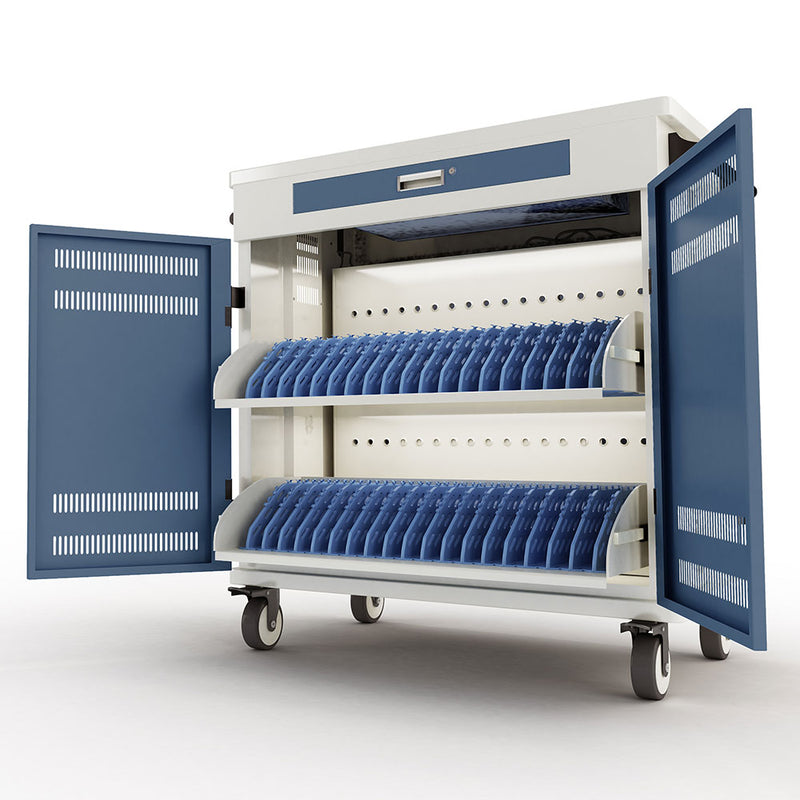
Why Multi-Device Charging Needs Proper Power Planning
Charging one laptop or tablet is straightforward. Charging 20, 30 or 40 devices from one mobile cart or cabinet requires more planning.
Every device charger draws electrical power. When many adaptors are connected to one charging system, the organisation must consider the combined load, the type of power connection, the charging window and whether all devices must begin charging at exactly the same time.
The correct configuration depends on:
- Number of devices — The total quantity that must be accommodated
- Device brand and model — Different brands have different charging requirements
- Charger or adaptor wattage — Higher wattage devices require more power
- Charging connector — AC adaptor, USB-C, or other connector types
- Whether the fleet is uniform or mixed — Mixed fleets often need AC sockets
- Available electrical circuit — What power is available at the installation site
- Required charging time — Overnight, between classes, or continuous
- Need for mobility — Fixed cabinet or mobile cart
- Cable-management requirements — How cables will be organised
- Future expansion — Will the fleet grow?
RIFE can recommend a configuration after reviewing this information.
Understanding the Main Multi-Device Charging Options
There are four primary approaches to multi-device charging. The right choice depends on your device fleet, electrical supply, and operational requirements.
AC Socket Charging
An AC socket charging cart contains internal power sockets so that each laptop, Chromebook or tablet can use its original manufacturer-supplied adaptor.
Advantages:
- Works with different device brands and charging connectors
- Allows the use of original device adaptors
- Suitable for many laptops and Chromebooks
- Practical when devices require different wattages
- Easier to retain when the fleet contains mixed models
Points to check:
- Adaptor dimensions
- Plug orientation
- Cable length
- Number of sockets
- Internal adaptor-storage space
- Combined connected load
- Power-strip arrangement
- Ventilation around adaptors
USB-C Power Delivery Charging
USB-C Power Delivery can charge compatible laptops, tablets, iPads and Chromebooks directly from integrated USB-C charging modules.
Advantages:
- Reduces the number of loose AC adaptors
- Creates cleaner internal cable organisation
- Supports compatible USB-C devices
- Can simplify deployment where all devices have similar charging requirements
- Different per-port power options may be available
Points to check:
- Does every device support charging through USB-C?
- What wattage does each device require?
- Does the device require a specific Power Delivery profile?
- Are the cables rated for the required wattage?
- Will the charging module supply sufficient power to every port?
- Are all fleet devices compatible with the selected configuration?
Timer-Controlled Charging
A charging timer controls when the charging system is energised. It may be used to start charging after operating hours, stop charging after a selected period or divide charging into scheduled windows.
Possible uses:
- Overnight charging
- School timetable-based charging
- Avoiding unnecessary continuous operation
- Scheduling charging before the next session
- Managing defined operating periods
Important: A timer controls charging according to time. It does not necessarily divide the devices into electrical groups unless that functionality is included in the particular system. Timer functions vary by model.
Power Sequencing
A power sequencer energises different power groups in stages instead of switching every connected charger on at the same instant.
Possible applications:
- High-capacity laptop charging carts
- Large mixed-adaptor fleets
- Systems connected through one main input
- Environments where staged startup is preferred
- Configurations requiring controlled power distribution
Important: A sequencer controls the order or timing in which power groups are activated. It is different from a simple timer that only switches the complete system on or off according to a schedule. Sequencer design and operation vary by model and project configuration.
AC Socket Charging or USB-C: Which Is Better for Your Devices?
A direct comparison of the two main charging approaches.
| Decision factor | AC socket charging | USB-C Power Delivery | What the buyer must verify |
|---|---|---|---|
| Device compatibility | Suitable for mixed devices using their original adaptors | Suitable only for devices that support compatible USB-C charging | Exact device model and charging connector |
| Power requirements | Determined by each original adaptor | The required wattage and Power Delivery profile must be supported by each port | Input rating shown on the original charger or device specification |
| Adaptor storage | Requires space for adaptors and associated cables | Can reduce the number of separate adaptor bricks inside the cart | Available internal cable and adaptor space |
| Fleet changes | Often easier when replacement devices use different connectors or adaptors | Works well when replacement devices continue to use compatible USB-C charging | Expected future device standards |
| Cable management | Requires management of adaptors, mains cables and device leads | Can provide a cleaner direct-to-device cable arrangement | Cable length, rating and replacement availability |
| Best suited for | Mixed laptop and Chromebook fleets | Uniform fleets of compatible tablets, laptops or Chromebooks | Whether the fleet is uniform or mixed |
📌 Neither method is universally better. The correct choice depends on device compatibility, wattage, fleet consistency and the organisation's charging workflow.
What Is the Difference Between a Charging Timer and a Power Sequencer?
Understanding the distinction between these two power-management functions.
Timer
Primary purpose: Control charging according to a schedule.
Typical function: Switch the system on and off or operate it during selected time periods.
Useful when: The organisation wants defined charging hours.
- Begin charging after the final class and stop before the next school day
- Schedule overnight charging for morning readiness
- Prevent unnecessary power draw during unoccupied periods
Sequencer
Primary purpose: Activate electrical groups in stages.
Typical function: Delay the startup of different groups of chargers.
Useful when: A larger device fleet should not energise every adaptor at exactly the same moment.
- Activate one group, then the next group after the configured interval
- Manage initial electrical demand at startup
- Distribute power draw across time
📌 A timer manages when charging occurs. A sequencer manages how charging groups are energised. Some systems may contain both functions.
What Electrical Information Is Required Before Selecting a Charging Cart?
Before recommending a charging configuration, RIFE should receive the charger information for the actual device fleet.
Information to provide:
- Number of devices — Total quantity to be charged
- Device brand and exact model — Critical for compatibility
- Charger wattage — The rated power consumption of each charger
- Charger input rating — Voltage and current requirements
- Charger output rating — Voltage and current delivered to the device
- Plug type — The connector type used
- Charging connector — AC, USB-C, or other
- Number of devices that must charge simultaneously — Critical for load calculation
- Available wall socket or circuit information — Existing electrical supply
- Required charging window — Available charging time
- Expected future fleet expansion — Growth planning
Estimated connected charger load:
Formula: Number of devices × Rated charger wattage = Estimated connected charger load
Why Charger Wattage Changes the Required Configuration
Simple illustrative examples of how charger wattage affects load calculations.
20 tablets using 18W chargers
20 × 18W = 360W
Preliminary rated charger total
30 laptops using 65W adaptors
30 × 65W = 1,950W
Preliminary rated charger total
40 laptops using 90W adaptors
40 × 90W = 3,600W
Preliminary rated charger total
⚡ The actual configuration must consider the product's rated input, circuit capacity, startup behaviour, charging pattern and whether every device charges simultaneously.
Which Charging Configuration Is Likely to Suit Your Fleet?
Use this guide to understand which approach aligns with your device fleet and operational needs.
Mixed laptops with original chargers
Different adaptors and wattages can remain paired with their original devices.
Uniform USB-C tablets
A consistent device fleet may use a common compatible charging arrangement.
Large laptop fleet
The connected load and startup behaviour require assessment.
Devices charged only overnight
Charging can be aligned with the operating schedule.
Devices used in several rooms
The complete device fleet can be stored, moved and charged together.
Devices assigned to separate users
Separate lockable compartments can support user-level access and accountability.
Power Management Is Only One Part of a Charging Solution
Several other design factors influence the effectiveness of a multi-device charging system.
Cable Management
Cables should remain organised, protected from sharp bends and positioned so that devices can be connected consistently.
Adaptor Storage
AC systems require sufficient space for charger bricks, plugs and excess cable. Internal adaptor-storage space must be considered.
Ventilation
Devices, adaptors and charging modules may generate heat, so airflow and product-specific ventilation must be considered.
Security
Consider the difference between common-door carts and individual-compartment charging lockers for device protection.
Mobility
Castors, handles, doorway dimensions and lift access matter when a loaded cart is moved between rooms.
Examples of RIFE Charging and Power-Management Configurations
These products represent different charging approaches and power-management capabilities.
 AC Charging + Timer
20-Device Economy Laptop & Tablet Charging Cart with Timer (R-LAB-20)
20-device cart using AC charging and scheduled timer control. Suitable for schools and training rooms.
- 20 device capacity
- AC socket charging
- Programmable timer
 Timer + Power Sequencer
Laptop, iPad, Tablet & Chromebook Charging Cart CP2
32-40 device cart with programmable timer and power sequencer. Suitable for larger institutional fleets.
- 32-40 device configuration
- Internal AC power arrangement
- Timer and sequencer
- Forced and natural ventilation
 Configurable AC or USB
Smart Mobile Charging Cart for Laptops/Tablets/iPads, 30 Capacity (RLAB30E)
Mobile 30-device solution with different charging configurations available. Suitable for schools, offices and laboratories.
- Up to 30 devices
- AC or USB by configuration
- Power-management options by configuration
 High Capacity + Timer
40-Device Economy Laptop & Tablet Charging Cart with Programmable Timer (R-LAB40T)
High-capacity institutional cart with programmable timer option. Suitable for large deployments.
- High-capacity configuration
- AC charging
- Timer option available
 USB-C PD — Up to 60W Per Port
36-Device USB-C PD Charging Cart
36-position USB-C Power Delivery cart with up to 60W per port. Suitable for uniform compatible USB-C fleets.
- 36 device positions
- USB-C Power Delivery up to 60W per port
- Three forced-exhaust cooling fans
- AC 200-240V, 50Hz, 10A input
Multi-Port Tablet Charging32-Device Tablet Charging Cabinet
32-position charging cabinet for tablets up to 11 inches. Available in charging-only or charging-and-sync versions.
- 32 device positions
- Tablets up to 11 inches
- QC3.0 and BC1.2 support
- Intelligent temperature-control ventilation
Product Comparison
Compare key charging and power-management features across different RIFE products.
| Product | Capacity | Device type | Charging method | Power-management function | Best suited for | Link |
|---|---|---|---|---|---|---|
| R-LAB-20 | 20 devices | Laptops, Chromebooks and compatible tablets | AC sockets | Timer | Schools and training rooms | View → |
| CP2 | 32–40 device configuration | Laptops, tablets, iPads and Chromebooks | Internal AC power arrangement | Timer and sequencer | Larger institutional fleets | View → |
| RLAB30E | Up to 30 devices | Laptops, tablets and iPads | AC or USB by configuration | Subject to selected configuration | Schools, offices and laboratories | View → |
| R-LAB40T | High-capacity configuration | Laptops and compatible portable devices | AC configuration | Timer option | Large institutional deployments | View → |
| RP36-B-60W | 36 devices | USB-C-compatible laptops and tablets | USB-C PD up to 60W per port | Integrated multi-port charging | Uniform compatible USB-C fleets | View → |
| RM32 | 32 tablets | Tablets up to 11 inches | Multi-port USB charging | Charging-only or charging-and-sync versions | Tablet fleets | View → |
⚠️ Where features vary, please note: Subject to selected configuration. Confirm final specifications with your RIFE representative.
Information to Share With RIFE Before Requesting a Charging Solution
To help us recommend the right configuration, please provide as much of the following information as possible.
Where Multi-Device Charging Solutions Are Deployed
RIFE charging systems are used across multiple environments.
Schools and colleges
Classroom laptop, Chromebook and tablet fleets. Keep devices charged and organised between classes.
Corporate offices
Training devices, pooled laptops and shared equipment. Support hot-desking and meeting rooms.
Hospitals and healthcare
Shared tablets, laptops, scanners and communication devices for clinical and administrative use.
Training centres
Devices prepared between scheduled sessions. Ensure equipment is ready for every training session.
Libraries and examination centres
Centrally managed shared devices for public access and examination use.
Government and institutional projects
Larger fleet and tender-based requirements requiring scalable, configurable charging solutions.
Questions About Charging-Cart Power Management
Find answers to the most common questions about multi-device charging systems.
What is a charging-cart power-management system? ▼
It is the combination of sockets, charging modules, timers, sequencers, protection components and controls used to distribute power to multiple devices inside a cart or cabinet.
Is AC socket charging better than USB-C? ▼
Neither is universally better. AC sockets are often suitable for mixed fleets using original adaptors, while USB-C can simplify cabling when every device supports the selected Power Delivery wattage and profile.
What does a timer do in a charging cart? ▼
A timer controls when the charging system operates, allowing charging to start, stop or run during selected periods.
What does a power sequencer do? ▼
A sequencer activates different electrical groups in stages rather than energising every connected charger at exactly the same moment.
Is a timer the same as a sequencer? ▼
No. A timer controls when charging occurs, while a sequencer controls how different power groups are activated.
Can one USB-C charging cart charge laptops and tablets together? ▼
It can only do so when every device supports the charging system's available USB-C Power Delivery profiles and wattage.
Can original laptop adaptors be used inside a charging cart? ▼
Yes, an appropriately designed AC socket cart can store and connect original device adaptors, subject to available socket, cable and adaptor space.
How do we calculate the approximate connected load? ▼
A preliminary estimate can be calculated by multiplying the number of devices by each charger's rated wattage, but the final electrical design must be reviewed technically.
Do all devices need to charge simultaneously? ▼
Not necessarily. The required charging window, battery state and daily workflow determine whether simultaneous, scheduled or staged charging is more appropriate.
Does a charging cart prevent battery overcharging? ▼
Battery charging is primarily controlled by the device and its compatible charger. Confirm whether the specific product has a verified control function.
What information does RIFE need to recommend a charging solution? ▼
RIFE needs the device model, quantity, charger rating, connector type, charging schedule, available electrical supply, slot-size requirement and operating environment.
Can charging systems be customised? ▼
Capacity, internal layout, socket arrangement, charging technology and power-management options may be configurable, subject to technical feasibility and the selected model.
Select the Right Charging Architecture Before Selecting the Cart
Share your device list, charger specifications, fleet size, charging window and site requirements. RIFE can review whether your organisation needs AC sockets, USB-C charging, a timer, a power sequencer or a configured combination.