
Ask about RIFE RCLT Single Monitor Arm – Clamp
Need Help?
Get the right model recommendation.
Send your quantity, use case and accessories needed. Rife will suggest the correct configuration.
Single Monitor Arm
The RIFE RCLT Single Monitor Arm – Clamp is a professional monitor-support solution designed for organisations and professionals who need a stable, adjustable and space-efficient display setup. Its primary search and buying intent is single monitor arm. The model is presented separately from other RIFE mounts because its configuration—clamp—addresses a specific workstation requirement rather than a generic monitor-holding need.
This model supports a single-display arrangement. It is intended to help place screens at practical viewing heights, recover usable desk space and organise cables around the work area. Before ordering, match the monitor size, total weight, VESA pattern, desk thickness and required screen arrangement with the confirmed specification of the selected variant.
Why this model is different
The RIFE RCLT is positioned for buyers who already know the number of displays and the preferred mounting style. Instead of using one broad “monitor stand” description for every model, this page explains the specific arrangement, installation method and screen class associated with this product. That makes comparison easier for procurement teams and reduces the risk of selecting a mount that is unsuitable for the desk or displays.
Key features
- Desk-clamp mounting keeps the base area compact and should be matched to the permitted desk-thickness range.
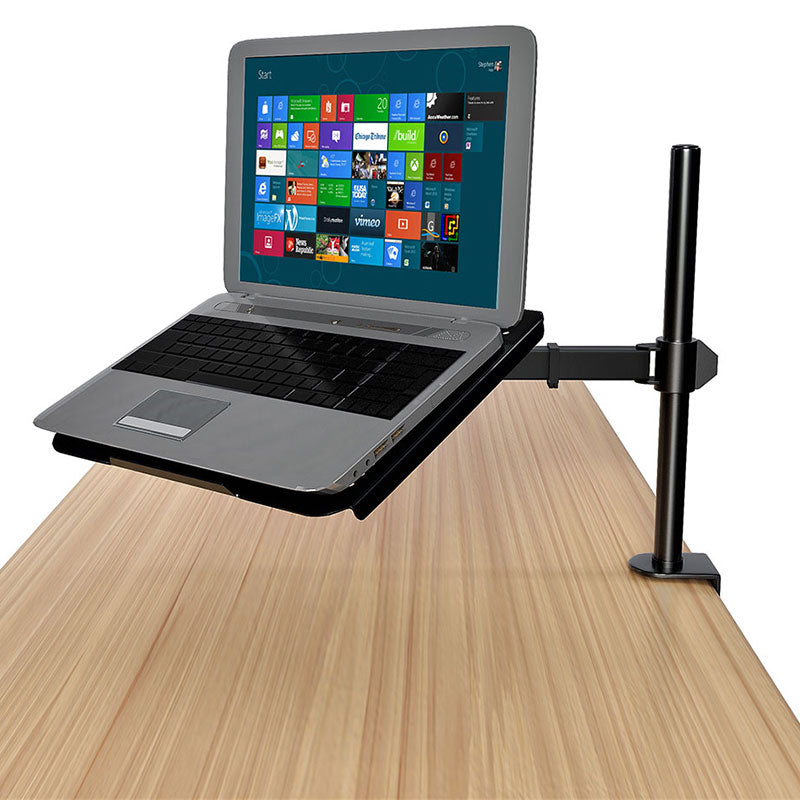
- COMPATIBILITY: The ventilated 14 x 12 tray is made to fit most laptops and supports weights up to 22 lbs.
- FULL ARTICULATION: Adjustable arm gives 15 tilt, 360 swivels, 360 rotation, and height adjustment along the center pole.
- DESK CLAMP: Mounts to the back of your desk (up to 4 thick) via a heavy-duty C-clamp.
- INTEGRATED CABLE MANAGEMENT: Keep your power and AV cables clean and organized with detachable cable clips on the arms and center pole.
- EASY INSTALLATION: All the necessary tools and hardware for easy assembly are provided.
Technical specifications
| Model | RCLT |
|---|---|
| Product type | Single Monitor Arm |
| Mounting method | Desk Clamp |
| Compatibility | Confirm monitor size, VESA and weight before ordering |
Specifications are based on the supplied product listing. Confirm the final configuration, included hardware and compatibility before placing an order.
Display positioning and ergonomic use
High-grade steel construction along with the heavy-duty C-clamp ensures your laptop will be kept secure. Mount can be converted to a monitor stand with VESA compatibility and supports the majority of laptops and monitors on the market. A: The ventilated tray fits most laptops and supports up to 22 lbs. A: It mounts using a heavy-duty C-clamp that fits desks up to 4 inches thick.
A monitor arm or stand should allow the primary viewing area to be positioned without forcing the user to lean forward or repeatedly turn the neck. Multi-monitor users should align the screens according to the frequency of use: the main display should remain central, while secondary displays can be angled inward. The mount does not by itself guarantee an ergonomic workstation; chair height, desk height, viewing distance and lighting must also be considered.
Recommended applications
- Corporate workstations
- Home offices
- Reception desks
- Production areas
- Shared workstations
This product can also be considered for project-based installations where several workstations require a consistent screen arrangement. For bulk requirements, RIFE can review monitor models, desk construction and layout drawings before recommending the appropriate base, arm or pole configuration.
Compatibility checks before ordering
- Monitor size: check both diagonal size and physical width, especially for curved and ultrawide displays.
- Monitor weight: compare the weight without the original stand against the stated load per arm.
- VESA pattern: confirm the rear mounting-hole spacing and whether an adapter is required.
- Desk construction: verify thickness, edge clearance and strength for clamp or grommet installation.
- Screen arrangement: confirm horizontal, vertical, stacked or mixed portrait/landscape use.
- Cable length: allow sufficient cable movement through the full adjustment range.
Installation and adjustment guidance
Install the mount on a sound, level surface and use the supplied hardware intended for the selected mounting method. Support the monitor while attaching the VESA plate. Tighten fasteners evenly, but do not overtighten into the monitor chassis. After installation, route power and signal cables with enough slack for tilt, swivel and height movement. Gas-spring models should be tension-adjusted only after the monitor is attached.
For large, heavy or multi-screen configurations, two-person installation is recommended. Recheck fasteners after initial use and whenever monitors are changed. Where the desk construction or monitor compatibility is uncertain, obtain technical confirmation before installation.
Related RIFE monitor solutions
- RIFE EF003T Heavy-duty Ultrawide Monitor Arm – Freestanding, Vertical
- RIFE L2D Gas Spring Monitor Arm – 13–27″
- RIFE WGS001 Gas Spring Monitor Arm – Clamp, White
Request a project quotation
Share the monitor brand and model, quantity of screens, weight per screen, VESA pattern, desk thickness, preferred arrangement and required quantity. RIFE will confirm compatibility and prepare a quotation for the suitable monitor-mount configuration. For institutional or multi-workstation projects, layout and installation requirements can also be reviewed.
Frequently asked questions
Which screens suit the RCLT?
Compatibility depends on monitor size, weight and VESA pattern. Share the monitor model number for confirmation.
How do I check VESA compatibility?
Measure the horizontal and vertical spacing between the four threaded mounting holes on the rear of the monitor. Common patterns include 75 × 75 mm and 100 × 100 mm, but the product specification must be checked.
Can the screens be used in portrait and landscape orientation?
Where rotation is included in the stated movement range, the display can be repositioned after checking cable clearance and monitor dimensions.
What information is required for a quotation?
Provide the number of monitors, screen size, weight per screen, VESA pattern, desk thickness, preferred mounting method, delivery city and quantity required.